Temporary specifications allow users to keep working when the exact specification they need is not yet available in the TMaSS library.
Instead of waiting for a new specification to be created by a global administrator, an authorised user can create a temporary specification, assign it to assets immediately, and continue entering data without delaying operations.
What is a temporary specification?
A temporary specification is a user-created specification that is intended for short-term operational use until it has been reviewed by a Global Administrator.
Temporary specifications can be created for:
- Vehicles
- Tyres
- Rims
They are created in the Library module and remain marked as Temporary until one of the following happens:
- the specification is approved
- the specification is modified and then approved
- the specification is swapped with an existing specification
Why temporary specifications are useful
Temporary specifications improve productivity by allowing users to continue working immediately when a required specification does not yet exist.
This means users can:
- create the required specification themselves
- assign it to assets straight away
- continue asset creation and data entry without waiting for head office or a global administrator
Later, the specification can be reviewed and standardised centrally.
How review and approval works
All temporary specifications must be reviewed by a Global Administrator.
After review, the Global Administrator can:
- Approve the temporary specification as-is
- Modify the specification and then approve it
- Swap it with an existing approved specification already in the library
If a temporary specification has already been assigned to assets, and the Global Administrator adjusts that specification, those updates can be pushed out to all assets using it. This ensures the assets stay aligned to the approved master specification without needing each asset to be manually updated one by one.
Security requirements
To create a temporary specification, the user must have a security role that includes:
- access to the Library module, and
- the Create Temporary Specification permission
Without this permission, the user will be able to view specifications but will not be able to create temporary ones.
Where temporary specifications are created
Temporary specifications can only be created in the Library module.
From the Library module, users can navigate to the relevant specification type:
- Vehicles
- Tyres
- Rims
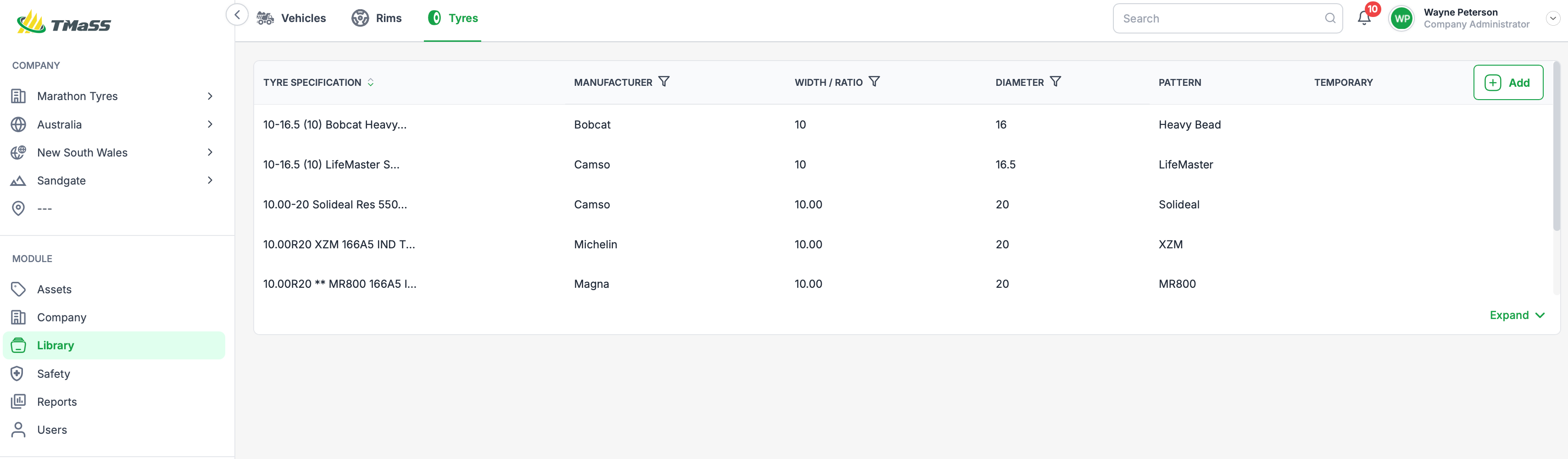
As shown in the image, the Library area provides separate tabs for each specification type, allowing users to manage the appropriate library category before creating a new temporary specification. If the 'Add' button is not visible, please contact your administrator as your user account doesn't posses the appropriate rights.
How to use temporary specifications
1. Open the Library module
Go to Library from the left-hand navigation.
2. Select the specification type
Choose the relevant tab:
- Vehicles
- Rims
- Tyres
3. Create the temporary specification
If you have the required security permission, click Add and enter the specification details.
4. Assign it to assets
Once created, the temporary specification can be assigned to assets so work can continue immediately.
5. Wait for review
The temporary specification remains marked Temporary until it is reviewed by a Global Administrator.
6. Apply final updates
If the specification is adjusted during review, the approved changes can be pushed to any assets already using that temporary specification.
What happens after approval
Once reviewed, the temporary specification will move out of its temporary state by being:
- approved directly,
- approved after modification, or
- replaced with an existing standard specification
Until that point, it remains clearly identified as Temporary, making it easy for administrators to track which specifications still require review.
Summary
Temporary specifications are designed to balance operational speed with data governance.
They allow authorised users to:
- create missing specifications quickly
- assign them immediately to assets
- avoid delays in day-to-day work
At the same time, they ensure all new specifications are still centrally reviewed and standardised by a Global Administrator before becoming permanent.
Was this article helpful?
That’s Great!
Thank you for your feedback
Sorry! We couldn't be helpful
Thank you for your feedback
Feedback sent
We appreciate your effort and will try to fix the article